画面イメージ
【AS】アクションゲーム
- アクションゲーム
-
- 左右のキーで移動
- スペースキーでジャンプ
解説
- コンテンツのつくりかた
-
- キーボードの左右が押下されたら_onKeyDown関数を呼び出す
- キーボードの左右が離されたら_onKeyUpUp関数を呼び出す
- スペースが押されたら_jump関数を呼び出す
- キーボード左キーが押下された時、KeyboardLEFTを適用
- キーボード右キーが押下された時、KeyboardRIGHTを適用
- 常時起動する _onEnterFrame関数
- X移動量の計算処理 _calcXVector関数を呼び出す
- Y移動量の計算処理 _calcYVector関数を呼び出す
- 移動処理 _move関数を呼び出す
- アニメーション処理_changeGraphic関数を呼び出す
キーワード
- Math.floor(value:Number):Number
-
- 指定された数値の小数点以下を切り捨てて、整数値を返す
- 戻り値:引数に指定された数値以下の最も大きい整数
- 使用例:Math.floor(3.21); // 3
- 使用例:Math.floor(-3.21); // - 4
- Math.ceil(value:Number):Number
-
- 指定された数値の小数点以下を切り上げて整数値を変えす
- 戻り値:引数に指定された数値以下の最も大きい整数
- 使用例:Math.ceil(3.21); // 4
- 使用例:Math.ceil(-3.21); // -3
- ( matrix[Y][X] != null ) ? matrix[Y][X] : 1;
-
- 三項演算子: (条件式) ? 値1:値2;
- 条件式がtrueなら値1, falseなら値2を返す。
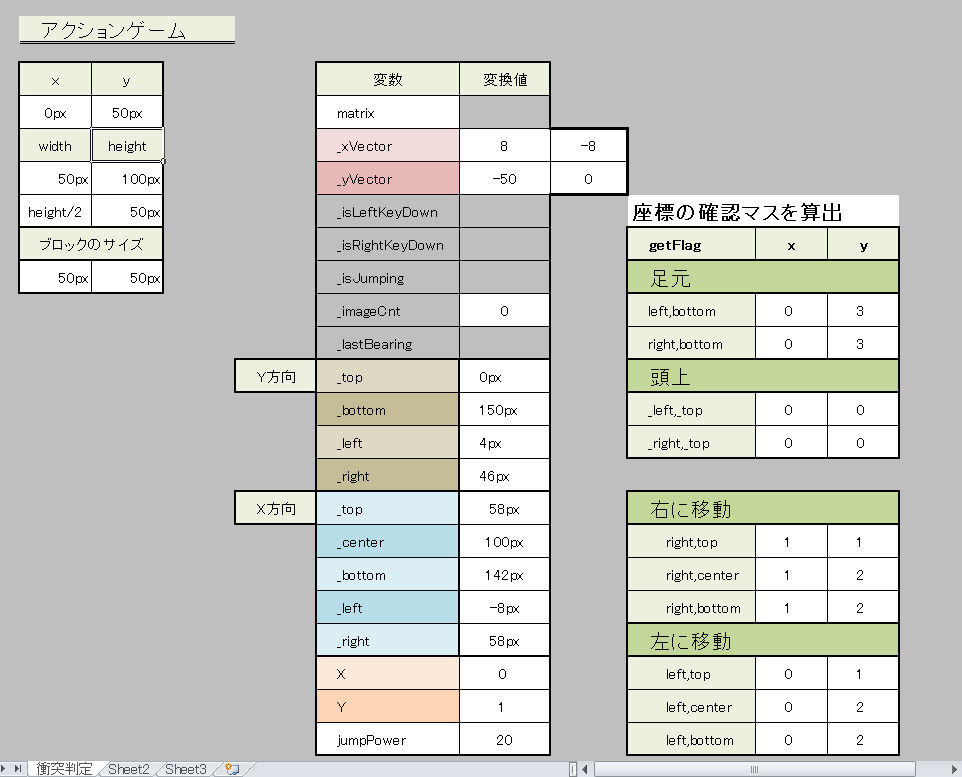
| 型 | 初期値 | 用途 | |
|---|---|---|---|
| matrix | Array | - | 衝突判定の座標 |
| _xVector | Number | 0 | 横移動量 |
| _yVector | Number | 0 | 縦移動量 |
| _isLeftKeyDown | Boolean | false | 左キーが押されているか判定 |
| _isRightKeyDown | Boolean | false | 右キーが押されている判定 |
| _isJumping | Boolean | false | ジャンプ状態か判定 |
| _imageCnt | uint | 0 | タイムラインのフレームを指定する |
| _lastBearing | String | normal | キャラクターのムービークリップのタイムラインを指定する |
| ローカル変数 | |||
| 型 | 初期値 | 用途 | |
| _top | Number | y+_yVector | 移動後のキャラクターの上端のY座標 |
| _center | Number | --- | 移動後のキャラクターの上端のY座標 |
| _bottom | Number | y+height+_yVector | 移動後のキャラクターの下端のY座標 |
| _left | Number | x+4 | 移動後のキャラクターの左端のX座標 |
| _right | Number | x+width-4 | 移動後のキャラクターの右端のX座標 |
| X | Number | x/20 | matrixのX座標上のフラグ:325px/20=16 |
| Y | Number | y/20 | matrixのY座標上のフラグ:325px/20=16 |
| jumpPower | Number | 20 | キャラクターを上昇させる |
関数一覧
- _onKeyDown
- _onKeyUp
- _onEnterFrame
- _calcXVector
- _calcYVector
- _move
- jump
- getFlag
- _changeGraphic
条件分岐
- 左キーが押下されたら
-
// _xVector を補正します。
    if( 8 < _xVector ){
        _xVector = 8;
    }else if( _xVector < 2 && 0 < _xVector ){
        _xVector = 0;
    }
_xVectorが最大速度:8を超えたら、_xVectorに8を代入。最大速度を超えることを防ぐ
では、_xVectorが0か1であり、0より多い場合、つまり_xVectorが1の場合は、_xVectorに0を代入。マイナスになるのを防ぐ。 - 右キーが押下されたら
-
// _xVector の力を補正します。
if( _xVector < -8 ){
    _xVector = -8;
}else if( -2 < _xVector && _xVector < 0 ){
    _xVector = 0;
}
_xVectorが-8より大きい(-9,-10,-11)なら、_xVectorに-8を代入。最大速度を超えることを防ぐ。
_xVectorが-1の時、_xVectorに0にする。 - ジャンプ処理
-
if( _yVector != 0 || _isJumping == true ){
		return;
	}
_yVector が0ではない状態、または、_isjumpingがtrueだったら、なにもしない。
- X方向の移動量の計算
-
// 左右どちらかのキーが押されていた場合X方向の力を変更する。 if( _isLeftKeyDown == true ){ _xVector -= 0.5; }else if( _isRightKeyDown == true ){ _xVector += 0.5; }else{ // どちらも押されていない場合には0に近づける。 _xVector += ( 0 - _xVector ) * 0.3; if( Math.abs( 0 - _xVector ) < 1 ){ _xVector = 0; } }/else - 衝突判定がブロックを突き抜けることを避けるため // 絶対値を区切りの長さ - 1 に補正する
-
if( 区切りの長さ - 1 < Math.abs( _xVector ) ){ _xVector = ( 区切りの長さ - 1 ) * ( ( _xVector < 0 ) ? -1 : 1 ); } - Y方向の移動 // 移動先に障害物が無いか調べる.
-
//_yVectorが正の値なら
if( 0 < _yVector ){
    // --- 地面に立っている時や落下時. ---
    // 足元に地面があるかをチェックする。
    if( 0 < getFlag( _left, _bottom ) || 0 < getFlag( _right, _bottom ) ){
        // --- 地面があった場合 ---
        // 地面の位置で停止させる。
        y = Math.floor( _top / 20 ) * 20;
        // Y方向の力は地面で0になるので, _yVector を 0 にする。
        _yVector = 0;
        // 地面に立っているので, _isJumping を false にする。
        _isJumping = false;
    }else{
        // --- 地面がなかった場合 ---
        // 移動させる。
        y += _yVector;

    }
    //_yVectorがマイナスの値なら
}else if( _yVector < 0 ){
    // --- ジャンプ上昇時. ---
    // 頭上に天井があるかをチェックする。
    if( 0 < getFlag( _left, _top ) || 0 < getFlag( _right, _top ) ){
    // --- 天井があった場合 ---
    // 天井の位置で停止させる。
    y = Math.ceil( _top / 20 ) * 20;
    // Y方向の力は天井で0になるので, _yVector を 0 にする。
    _yVector = 0;
}else{
    // --- 障害物がなかった場合 ---
    // 移動させる。
    y += _yVector;

}
fla
- タイムライン(画像13枚)
-
- 2フレーム:normal
- 3フレーム:jump_left
- 4フレーム:jump_right
- 5フレーム:turn_left
- 6フレーム:turn_right
- 7フレーム:left1
- 8フレーム:left2
- 9フレーム:left3
- 10フレーム:left4
- 11フレーム:right1
- 12フレーム:right2
- 13フレーム:right3
- 14フレーム:right4
As
/*キャラクターのタイムライン1フレームに記載*/
import flash.events.KeyboardEvent;
import flash.ui.Keyboard;

// --- マトリクスの定義 ---

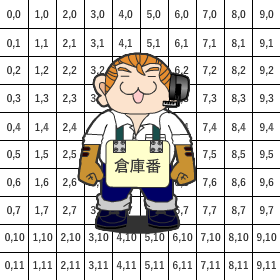
// 世界を定義します.X:30×Y:20
var matrix:Array = [
	[0,0,0,0,0,0,0,0,0,0,0,0,0,0,0,0,0,0,0,0,0,0,0,0,0,0,0,0,0,0],
	[0,0,0,0,0,0,0,0,0,0,0,0,0,0,0,0,0,0,0,0,0,0,0,0,0,0,0,0,0,0],
	[0,0,0,0,0,0,0,0,0,0,0,0,0,0,0,0,0,0,0,0,0,0,0,0,0,0,0,0,0,0],
	[0,0,0,0,0,0,0,0,0,0,0,0,0,0,0,0,0,0,0,0,0,0,0,0,0,0,0,0,0,0],
	[0,0,0,0,0,0,0,0,0,0,0,0,0,0,0,0,0,0,0,0,0,0,0,0,0,0,0,0,0,0],
	[0,0,0,0,0,0,0,0,0,0,0,0,0,0,0,0,0,0,0,0,0,0,0,0,0,0,0,0,0,0],
	[0,0,0,0,0,0,0,0,0,0,0,0,0,0,0,0,0,0,0,0,0,0,0,0,0,0,0,0,0,0],
	[0,0,0,0,0,0,0,0,0,0,0,0,0,0,0,0,0,0,0,0,0,0,0,0,0,0,0,0,0,0],
	[0,0,0,0,0,0,0,0,0,0,0,0,0,0,0,0,0,0,0,0,0,0,0,0,0,0,0,0,0,0],
	[0,0,0,0,0,0,0,0,0,0,0,0,0,0,0,0,0,0,0,0,0,0,0,0,0,0,0,0,0,0],
	[0,0,0,0,0,0,0,0,0,0,0,0,0,0,0,0,0,0,0,0,0,0,0,0,0,0,0,0,0,0],
	[0,0,0,0,0,0,0,0,0,0,0,0,0,0,1,0,0,0,0,0,0,0,0,0,0,0,0,0,0,0],
	[0,0,0,0,0,0,0,0,0,0,0,0,0,0,1,0,0,0,0,0,0,0,0,0,0,0,0,0,0,0],
	[0,0,0,0,0,0,0,0,0,0,0,0,0,0,1,0,0,0,0,0,0,0,0,0,0,0,0,0,0,0],
	[0,0,0,0,0,0,0,0,0,0,0,0,0,0,1,0,0,0,0,0,0,0,0,0,0,0,0,0,0,0],
	[0,0,0,0,0,0,0,0,0,0,0,0,0,0,1,0,0,0,0,0,0,0,0,0,0,0,0,0,0,0],
	[0,0,0,0,0,0,0,0,0,0,0,0,0,0,1,0,0,0,0,0,0,0,0,0,0,0,0,0,0,0],
	[0,0,0,0,0,0,0,0,0,0,0,0,0,0,0,0,0,0,0,0,0,0,0,0,0,0,0,0,0,0],
	[0,0,0,0,0,0,0,0,0,0,0,0,0,0,0,0,0,0,0,0,0,0,0,0,0,0,0,0,0,0],
	[1,1,1,1,1,1,1,1,1,1,1,1,1,1,1,1,1,1,1,1,1,1,1,1,1,1,1,1,1,1]
];

// --- プロパティの定義 ---

// 移動量を保持するプロパティを定義.
var _xVector:Number = 0;
var _yVector:Number = 0;
// 状態を保持するプロパティを定義.
var _isLeftKeyDown:Boolean;
var _isRightKeyDown:Boolean;
// ジャンプ状態を保持するプロパティを定義.
var _isJumping:Boolean;
/* 横移動アニメーション画像のインデックス. */
var _imageCnt:uint = 0;
/** 最後に向いていた体の向き. */
var _lastBearing:String = "normal";

// --- キーボード操作の処理 ---

this.stage.addEventListener( KeyboardEvent.KEY_DOWN, _onKeyDown );
this.stage.addEventListener( KeyboardEvent.KEY_UP, _onKeyUp );

// キーボードが押された際の処理.
function _onKeyDown( event:KeyboardEvent ):void{
	switch( event.keyCode ){
		case Keyboard.SPACE :
			jump();
			break;
		case Keyboard.LEFT :
			// _xVector を補正します.
			if( 8 < _xVector ){
				_xVector = 8;
			}else if( _xVector < 2 && 0 < _xVector ){
				_xVector = 0;
			}
			_isLeftKeyDown = true;
			break;
		case Keyboard.RIGHT :
			// _xVector の力を補正します.
			if( _xVector < -8 ){
				_xVector = -8;
			}else if( -2 < _xVector && _xVector < 0 ){
				_xVector = 0;
			}
			_isRightKeyDown = true;
			break;
	}
}

// キーボードが離された際の処理.
function _onKeyUp( event:KeyboardEvent ):void{
	switch( event.keyCode ){
		case Keyboard.LEFT :
			_isLeftKeyDown = false;
			break;
		case Keyboard.RIGHT :
			_isRightKeyDown = false;
			break;
	}
}

// ジャンプ処理.
function jump( jumpPower:Number = 20 ):void{
	// 現在地上に立っていない場合,ジャンプ中である場合には処理を行いません.
	if( _yVector != 0 || _isJumping == true ){
		return;
	}
	// yVentor をジャンプパワー分だけ上に向けます.
	_yVector = - 20;
	// _isJumping を true にしてジャンプ中である事を保持します.
	_isJumping = true;
}

// --- 毎フレームの処理 ---

addEventListener( Event.ENTER_FRAME, _onEnterFrame );

// 毎フレーム処理.
function _onEnterFrame( evt:Event ):void{
	// --- 移動量の計算処理. ---
	_calcXVector();
	_calcYVector();
	// --- 移動処理. ---
	_move();
	// --- アニメーション処理. ---
	_changeGraphic();
}

// X方向の移動量を計算.
function _calcXVector():void{
	// 左右どちらかのキーが押されていた場合X方向の力を変更する.
	if( _isLeftKeyDown == true ){
		_xVector -= 0.5;
	}else if( _isRightKeyDown == true ){
		_xVector += 0.5;
	}else{
		// どちらも押されていない場合には0に近づける.
		_xVector += ( 0 - _xVector ) * 0.3;
		if( Math.abs( 0 - _xVector ) < 1 ){
			_xVector = 0;
		}
	}
	// 衝突判定がブロックを突き抜けることを避けるため
	// 絶対値を区切りの長さ - 1 に補正する.
	if( 20 - 1 < Math.abs( _xVector ) ){
		_xVector = ( 20 - 1 ) * ( ( _xVector < 0 ) ? -1 : 1 );
	}
}

// Y方向の移動量を計算.
function _calcYVector():void{
	// Y方向の力を重力分加算します.
	_yVector += 2.0;
	// 衝突判定がブロックを突き抜けることを避けるため
	// 絶対値を区切りの長さ - 1 に補正する.
	if( 20 - 1 < Math.abs( _yVector ) ){
		_yVector = ( 20 - 1 ) * ( ( _yVector < 0 ) ? -1 : 1 );
	}
}

/*--------------
 移動処理.
----------------*/
function _move():void{

	// 移動後のキャラクターの上端のY座標.
	var _top:Number;
	// 移動後のキャラクターの中心のY座標.
	var _center:Number;
	// 移動後のキャラクターの下端のY座標.
	var _bottom:Number;
	// 移動後のキャラクターの左端のX座標.
	var _left:Number;
	// 移動後のキャラクターの右端のX座標.
	var _right:Number;

	// --- Y方向に移動後のキャラクタの判定領域を計算します. ---
	_top = Math.floor( y ) + _yVector;
	_bottom = Math.floor( y + height ) + _yVector;
	// ブロックの隙間を通れるようにするため左右の判定は小さめにしておきます.
	_left = Math.floor( x ) + 4;
	_right = Math.floor( x + width ) - 4;

	// --- Y方向の移動. ---
	// 移動先に障害物が無いか調べる.
	if( 0 < _yVector ){
		// --- 地面に立っている時や落下時. ---
		// 足元に地面があるかをチェックする.
		if( 0 < getFlag( _left, _bottom ) ||
			0 < getFlag( _right, _bottom ) ){
			// --- 地面があった場合 ---
			// 地面の位置で停止させる.
			y = Math.floor( _top / 20 ) * 20;
			// Y方向の力は地面で0になるので, _yVector を 0 にする.
			_yVector = 0;
			// 地面に立っているので, _isJumping を false にする.
			_isJumping = false;
		}else{
			// --- 地面がなかった場合 ---
			// 移動させる.
			y += _yVector;

		}
	}else if( _yVector < 0 ){
		// --- ジャンプ上昇時. ---
		// 頭上に天井があるかをチェックする.
		if( 0 < getFlag( _left, _top ) ||
			0 < getFlag( _right, _top ) ){
			// --- 天井があった場合 ---
			// 天井の位置で停止させる.
			y = Math.ceil( _top / 20 ) * 20;
			// Y方向の力は天井で0になるので, _yVector を 0 にする.
			_yVector = 0;
		}else{
			// --- 障害物がなかった場合 ---
			// 移動させる.
			y += _yVector;

		}
	}

	// --- X方向の移動. ---
	// X方向に働く力が無い場合にはなにもしない.
	if( _xVector == 0 ){
		return;
	}
	// --- X方向に移動後のキャラクタの判定領域を計算します. ---
	// ブロックの間の隙間を通れるようにするため上下の判定は小さめにしておきます.
	_top = Math.floor( y ) + 8;
	_center = ( Math.floor( y + height / 2 ) );
	_bottom = Math.floor( y + height ) - 8;
	_left = Math.floor( x ) + _xVector;
	_right = Math.floor( x + width ) + _xVector;
	// 移動先に障害物が無いか調べる.
	if( 0 < _xVector ){
		// --- 右に移動している時. ---
		// 自分の右に壁があるかをチェックする.
		if( 0 < getFlag( _right, _top ) ||
			0 < getFlag( _right, _center ) ||
			0 < getFlag( _right, _bottom ) ) {
			// --- 壁があった場合 ---
			// 壁の位置で停止させる.
			x = Math.floor( _left / 20 ) * 20;
			// X方向の力は壁で弱くなるので, _xVector を 0.5 にする.
			_xVector = 0.5;
		}else{
			// --- 壁がなかった場合 ---
			// 移動させる.
			x += _xVector;
		}
	}else if( _xVector < 0 ){
		// --- 左に移動している時. ---
		// 自分の左に壁があるかをチェックする.
		if( 0 < getFlag( _left, _top ) ||
			0 < getFlag( _left, _center ) ||
			0 < getFlag( _left, _bottom ) ) {
			// --- 壁があった場合 ---
			// 壁の位置で停止させる.
			x = Math.ceil( _left / 20 ) * 20;
			// X方向の力は壁で弱くなるので, _xVector を 0.5 にする.
			_xVector = -0.5;
		}else{
			// --- 壁がなかった場合 ---
			// 移動させる.
			x += _xVector;
		}
	}
}

// matrixの( x, y )座標上のフラグを取得します.
function getFlag( x:Number, y:Number ):uint{
	var X:uint = Math.floor( x / 20 );
	var Y:uint = Math.floor( y / 20 );
	return ( matrix[Y][X] != null ) ? matrix[Y][X] : 1;
}

// キャラクタの画像を切り替えます.
function _changeGraphic(){
	// 地面に立っているかを調べる.
	if( _yVector == 0 && !_isJumping ){
		// --- 地面に立っている場合. ---
		// 移動中かを調べる.
		if( _xVector != 0 ){
			// --- 移動中. ---
			// _xVectorの値で最後の向きを変更する.
			if( _xVector < 0  ){
				_lastBearing = "left";
			}else{
				_lastBearing = "right";
			}
			// 横移動イメージ画像のインデックスを変更する.
			if( _imageCnt++ == 4 ){
				_imageCnt = 1;
			}
			// 画像を変更する.
			gotoAndStop(_lastBearing+_imageCnt);
		}else{
			// --- 棒立ち中. ---
			// 最後の向きを normal にし,画像を変更する.
			_lastBearing = "normal";
			gotoAndStop( _lastBearing );
		}
	}else{
		// --- ジャンプ中の場合. ---
		// 最後の向きによって画像を変更する.
		if( _lastBearing == "left" ){
			gotoAndStop( "jump_left" );
		}else if( _lastBearing == "right" ){
			gotoAndStop( "jump_right" );
		}
	}
}
プロフィール

| 名前 | いとう ともお |
|---|---|
| 仕事 | PCの修理受付・取扱説明書作成 |
| 好物 | 大豆食品 |
| スキル |
|