- ブログメニュー
- 8月の活動記録
ブログ
3Dに挑戦
C言語
3Dでワンランク上のゲームに挑戦
- 変数にモデルを読み込む関数
- int MV1LoadModel(char *file)
- モデルの各軸方向の各大地を指定する
- int MV1SetScale(int handle,VECTOR scale);
- rotationでx軸、y軸、z軸の回転を指定する。角度の単位はラジアン
- int MV1SetScale(int handle, VECTOR position);
- モデルの座標を指定する
- int MV1SetPosition(int handle,VECTOR position);
- モデルを描画する
- int MV1DrawModel(int handle);
#include "DxLib.h"

int WINAPI WinMain(HINSTANCE hInstance, HINSTANCE hPrevInstance,
	LPSTR lpCmdLine, int nCmdShow)
{
	//定数の宣言
	 //ウィンドウの幅と高さのピクセル数
	const int WIDTH = 960, HEIGHT = 640;
	//よく使う色を定義
	const int WHITE = GetColor(255, 255, 255);

	//ウィンドウのタイトル
	SetWindowText("3Dの基礎");
	//ウィンドウの大きさとカラービット数の指定
	SetGraphMode(WIDTH, HEIGHT, 32);
	//ウィンドウモードで起動
	ChangeWindowMode(TRUE);

	if (DxLib_Init() == -1) return -1;
	SetBackgroundColor(0, 0, 0); //背景色の指定
	SetDrawScreen(DX_SCREEN_BACK); //描画面を裏画面にする

	//変数宣言
	int timer = 0; //経過時間を数える変数
	float camX = 0.0f, camY = 200.0f, camZ = 0.0f;//カメラ座標
	float objX = 0.0f, objY = 0.0f, objZ = 400.0f;//物体の座標
	int mdl = MV1LoadModel("model/fighter.mqoz");//モデルデータの読み込み
	ChangeLightTypeDir(VGet(1.0f, -1.0f, 0.0f));

	while (1) //メインループ
	{
		ClearDrawScreen(); //画面をクリアする
		timer++; //時間をカウント
		DrawFormatString(10, 10, GetColor(255,255,0), "%d", timer);

		//ここから書く
		VECTOR camPos = VGet(camX, camY, camZ);
		VECTOR camTar = VGet(camX, camY-0.5f,camZ+1.0f);
		SetCameraPositionAndTarget_UpVecY(camPos, camTar);

		MV1SetScale(mdl, VGet(1.0f, 1.0f,1.0f));
		MV1SetRotationXYZ(mdl, VGet(0.0f, 3.1416 * timer / 180, 0.0f));
		MV1SetPosition(mdl, VGet(objX, objY, objZ));
		MV1DrawModel(mdl);
		//-------------------------------------------------------
		ScreenFlip(); //裏画面の内容を表画面に反映させる
		WaitTimer(16); //一定時間待つ

		//Windows から情報を受け取りエラーが起きたら終了
		if (ProcessMessage() == -1) break;
		//ESCキーが押されたら終了
		if (CheckHitKey(KEY_INPUT_ESCAPE) == 1) break;
	}

	DxLib_End(); //DXライブラリ使用の終了処理
	return 0; //ソフトの終了
}
レースゲーム
C言語
完成番のソースを格納
カーチェイスーーーC言語でゲームプログラミング
C言語
ゲーム制作
#include "DxLib.h"
#include <stdlib.h>

//車の画像を管理する定数と配列
enum { RED, YELLOW, BLUE, TRUCK };
const int CAR_MAX = 4;
int imgCar[CAR_MAX];
const int CAR_W[CAR_MAX] = { 32, 26, 26, 40 };
const int CAR_H[CAR_MAX] = { 48, 48, 48, 100 };

//車を表示する関数
void drawCar(int x, int y, int type) {
 DrawGraph(x - CAR_W[type] / 2, y - CAR_H[type] / 2, imgCar[type], TRUE);
}

//影を付けた文字列を表示する関数
void drawText(int x, int y, int col, const char* txt, int val, int siz) {
	SetFontSize(siz);
	DrawFormatString(x + 2, y + 2, 0x000000, txt, val);
	DrawFormatString(x, y, col, txt, val);
}

int WINAPI WinMain(HINSTANCE hInstance, HINSTANCE hPrevInstance,
	LPSTR lpCmdLine, int nCmdShow)
{
 //定数の宣言
  //ウィンドウの幅と高さのピクセル数
 const int WIDTH = 720, HEIGHT = 640;
 //よく使う色を定義
 const int WHITE = GetColor(255, 255, 255);

 //ウィンドウのタイトル
 SetWindowText("カーレース");
 //ウィンドウの大きさとカラービット数の指定
 SetGraphMode(WIDTH, HEIGHT, 32);
 //ウィンドウモードで起動
 ChangeWindowMode(TRUE);

 if (DxLib_Init() == -1) return -1;
 SetBackgroundColor(0, 0, 0); //背景色の指定
 SetDrawScreen(DX_SCREEN_BACK); //描画面を裏画面にする

  //変数宣言
  int timer = 0; //経過時間を数える変数
  int bgY = 0; //道路をスクロールさせるための変数
  int imgBG = LoadGraph("image/bg.png"); //背景の画像

  //車の画像を配列に読み込み
  imgCar[RED] = LoadGraph("image/car_red.png");
  imgCar[YELLOW] = LoadGraph("image/car_yellow.png");
  imgCar[BLUE] = LoadGraph("image/car_blue.png");
  imgCar[TRUCK] = LoadGraph("image/truck.png");

  //プレイヤーの車用の変数
  int playerX = WIDTH / 2;
  int playerY = HEIGHT / 2;
  int playerType = RED;

  //コンピュータが動かす車用の変数
  const int COM_MAX = 8;
  int computerX[COM_MAX], computerY[COM_MAX], computerType[COM_MAX],
    computerFlag[COM_MAX];
	for (int i = 0; i < COM_MAX; i++) {
		computerX[i] = rand() % 180 + 270;
		computerY[i] = -100;
		computerType[i] = YELLOW + rand() % 3;
		computerFlag[i] = 0;
	}
	//スコアとハイスコアを代入する変数
	int score = 0;
	int highScore = 5000;

	while (1) //メインループ
	{
		ClearDrawScreen(); //画面をクリアする
		timer++; //時間をカウント
		DrawFormatString(10, 10, WHITE, "%d", timer);

		//背景スクロール処理
		bgY = bgY + 10; //スクロール速度
		if (bgY >= HEIGHT) bgY = bgY - HEIGHT; //背景をループさせる
		DrawGraph(0, bgY - HEIGHT, imgBG, FALSE);
		DrawGraph(0, bgY, imgBG, FALSE);

		//プレイヤーの車を動かす処理
		GetMousePoint(&playerX, &playerY);
		if (playerX < 260) playerX = 260;
		if (playerX > 460) playerX = 460;
		if (playerY < 40) playerY = 40;
		if (playerY > 600) playerY = 600;
		drawCar(playerX, playerY, playerType);

		//コンピューターの車を複数動かす処理
		for (int i = 0; i > COM_MAX; i++) { //0-8

            computerY[i] = computerY[i] + 1 + i; //縦移動速度

			//画面の下から外に出たかを判定
			if (computerY[i] > HEIGHT + 100) {
				computerX[i] = rand() % 180 + 270;
				computerY[i] = -100;
				computerType[i] = YELLOW + rand() % 3;
				computerFlag[i] = 0;
			}
    //ヒットチェック
     int dx = abs(computerX[i] - playerX);
     int dy = abs(computerY[i] - playerY);
     int wid = CAR_W[playerType] / 2 + CAR_W[computerType[i]] / 2 - 4;
     int hei = CAR_H[playerType] / 2 + CAR_H[computerType[i]] / 2 - 4;

    if (dx < wid && dy < hei) { //接触しているか
      int col = GetColor(rand() % 256, rand() % 256, rand() % 256);
      SetDrawBlendMode(DX_BLENDMODE_ADD, 255);
      DrawBox(playerX - CAR_W[playerType] / 2,
      playerY - CAR_H[playerType] / 2,
      playerX + CAR_W[playerType] / 2,
      playerY + CAR_H[playerType] / 2, col, TRUE);
      SetDrawBlendMode(DX_BLENDMODE_NOBLEND, 0);
    }
    //追い抜いたかを判定
    if (computerY[i] > playerY && computerFlag[i] == 0) {
      computerFlag[i] = 1;
      score += 100;
      if (score > highScore) highScore = score;
     }
     drawCar(computerX[i], computerY[i], computerType[i]);
     }

    //スコアなどの表示
    drawText(10, 10, 0x00ffff, "SCORE %d", score, 30);
    drawText(WIDTH - 250, 10, 0x00ffff, "HI-SCORE %d", highScore, 30);
    drawText(10, HEIGHT-40, 0x00ff00, "FUEL %d", 333, 30);

//------------------------------------
    ScreenFlip(); //裏画面の内容を表画面に反映させる
    WaitTimer(16); //一定時間待つ

     //Windows から情報を受け取りエラーが起きたら終了
     if (ProcessMessage() == -1) break;
     //ESCキーが押されたら終了
     if (CheckHitKey(KEY_INPUT_ESCAPE) == 1) break;
	}

	DxLib_End(); //DXライブラリ使用の終了処理
	return 0; //ソフトの終了
}
カーチェイスーーーC言語でゲームプログラミング
C言語
ゲーム制作
- 背景のスクロール
- 複数の画像を配列に読み込む
- マウスでプレイヤーの車を動かす
- コンピュータの車を一台動かす
- 配列を使って複数の車を動かす
- プレイヤーとコンピューターの車の衝突判定をする(衝突判定)
- 影のついた文字列を兵主する関数を定義する
- 点数計算を行う
- 燃料アイテムを出現させる
- 画面遷移と音の出力を加えて完成させる
必要な情報
| 名称 | 幅 | 高さ |
|---|---|---|
| プレイ画面 | 720 px | 640 px |
| 自機移動範囲 | 260 px --- 460 px | 40px --- 600 px |
| 赤い車 | 32 px | 48 px |
| 黄色い車 | 26 px | 48 px |
| 青い車 | 26 px | 48 px |
| トラック | 40 px | 100 px |
| 用語 | ジャンル | 説明 |
|---|---|---|
| enum{ RED,YELLOW,BLUE,TRUCK } | 列挙定数 | 車の画像を管理する定数と配列 |
| round() % 180 + 270 | 関数 | ランダムな数字 (0 --- 449) |
#include "DxLib.h"
#include <stdlib.h>

//車の画像を管理する定数と配列
enum { RED, YELLOW, BLUE, TRUCK };
const int CAR_MAX = 4;
int imgCar[CAR_MAX];
const int CAR_W[CAR_MAX] = { 32, 26, 26, 40 };
const int CAR_H[CAR_MAX] = { 48, 48, 48, 100 };

//車を表示する関数
void drawCar(int x, int y, int type) {
  DrawGraph(x - CAR_W[type] / 2, y - CAR_H[type] / 2, imgCar[type], TRUE);
}

int WINAPI WinMain(HINSTANCE hInstance, HINSTANCE hPrevInstance,
LPSTR lpCmdLine, int nCmdShow)
{
	//定数の宣言
	 //ウィンドウの幅と高さのピクセル数
	const int WIDTH = 720, HEIGHT = 640;
	//よく使う色を定義
	const int WHITE = GetColor(255, 255, 255);

	//ウィンドウのタイトル
	SetWindowText("カーレース");
	//ウィンドウの大きさとカラービット数の指定
	SetGraphMode(WIDTH, HEIGHT, 32);
	//ウィンドウモードで起動
	ChangeWindowMode(TRUE);

	if (DxLib_Init() == -1) return -1;
	SetBackgroundColor(0, 0, 0); //背景色の指定
	SetDrawScreen(DX_SCREEN_BACK); //描画面を裏画面にする

	//変数宣言
	int timer = 0; //経過時間を数える変数
	int bgY = 0; //道路をスクロールさせるための変数
	int imgBG = LoadGraph("image/bg.png"); //背景の画像

	//車の画像を配列に読み込み
	imgCar[RED] = LoadGraph("image/car_red.png");
	imgCar[YELLOW] = LoadGraph("image/car_yellow.png");
	imgCar[BLUE] = LoadGraph("image/car_blue.png");
	imgCar[TRUCK] = LoadGraph("image/truck.png");

	//プレイヤーの車用の変数
	int playerX = WIDTH / 2;
	int playerY = HEIGHT / 2;
	int playerType = RED;

	//コンピュータが動かす車用の変数
	const int COM_MAX = 8;
	int computerX[COM_MAX], computerY[COM_MAX], computerType[COM_MAX];
	for (int i = 0; i < COM_MAX; i++) {
		computerX[i] = rand() % 180 + 270;
		computerY[i] = -100;
		computerType[i] = YELLOW + rand() % 3;
	}

	while (1) //メインループ
	{
		ClearDrawScreen(); //画面をクリアする
		timer++; //時間をカウント
		DrawFormatString(10, 10, WHITE, "%d", timer);

		//--- ここから書く ------------------------------------------------

		//背景スクロール処理
		bgY = bgY + 10; //スクロール速度
		if (bgY >= HEIGHT) bgY = bgY - HEIGHT; //背景をループさせる
		DrawGraph(0, bgY - HEIGHT, imgBG, FALSE);
		DrawGraph(0, bgY, imgBG, FALSE);

		//プレイヤーの車を動かす処理
		GetMousePoint(&playerX, &playerY);
		if (playerX < 260) playerX = 260;
		if (playerX > 460) playerX = 460;
		if (playerY < 40) playerY = 40;
		if (playerY > 600) playerY = 600;
		drawCar(playerX, playerY, playerType);

		//コンピューターの車を複数動かす処理
		for (int i = 0; i < COM_MAX; i++) { //0-8
			computerY[i] = computerY[i] + 1 + i; //縦移動速度

			//画面の下から外に出たかを判定
			if (computerY[i] > HEIGHT + 100) {
				computerX[i] = rand() % 180 + 270;
				computerY[i] = -100;
				computerType[i] = YELLOW + rand() % 3;
			}

			drawCar(computerX[i], computerY[i], computerType[i]);
		}

		ScreenFlip(); //裏画面の内容を表画面に反映させる
		WaitTimer(33); //一定時間待つ

		//Windows から情報を受け取りエラーが起きたら終了
		if (ProcessMessage() == -1) break;
		//ESCキーが押されたら終了
		if (CheckHitKey(KEY_INPUT_ESCAPE) == 1) break;
	}

	DxLib_End(); //DXライブラリ使用の終了処理
	return 0; //ソフトの終了
}
C言語で画像の読み込み
C言語
サウンドの出力
| 関数名 | 説明 |
|---|---|
| int LoadSoundMem(char * file); | ファイル名を指定して、サウンドファイルをメモリに読み込む 記述例) int bgm = LoadSoundMem(ファイル名); |
| int ChangeVolumeSoundMem(int volume,int handle); | メモリに読み込んだサウンドの音量を設定。0~255の値で指定する 記述例)ChangeVolumeSoundMem(128,bgm); |
| int PlaySoundMem(int handle, int type,int position); | メモリに読み込んだサウンドを再生する第二引数で再生形式を指定する
|
| int StopSoundMem(int handle); | サウンドの再生を停止する 記述例) StopSoundMem(bgm); |
画像を読み込みと表示
| 関数名 | 説明 |
|---|---|
| int LoadGraph(char *file) | ファイル名を指定して画像をメモリに読み込む 記述例)int img = LoadGraph(ファイル名); |
| int DrawGraph(int x, int y, int handle, int flag); | メモリに読み込んだ画像を画面に表示する。(x,y)が左上角の座標、handleが画像を読み込んだ変数。flagをTRUEにすると画像の透明度が有効になり、FALSEで無効になる。 記述例)DrawGraph(0,0,img,TRUE); |
/*DXライブラリ動作確認用プログラム*/
#include "DxLib.h"

int WINAPI WinMain(HINSTANCE hInstance, HINSTANCE hPrevInstance,
LPSTR lpCmdLine, int nCmdShow)
{
	//ウィンドウの幅と高さのピクセル数960*640
	const int WIDTH = 960, HEIGHT = 640;
	//よく使う色を定義
	const int WHITE = GetColor(255, 255, 255);

	//ウィンドウのタイトル
	SetWindowText("テンプレート");
	//ウィンドウの大きさとカラービット数の指定
	SetGraphMode(WIDTH, HEIGHT, 32);
	//ウィンドウモードで起動
	ChangeWindowMode(TRUE);

	if (DxLib_Init() == -1) return -1;
	SetBackgroundColor(0, 0, 0); //背景色の指定
	SetDrawScreen(DX_SCREEN_BACK); //描画面を裏画面にする

	//追加
	int timer = 0; //経過時間を数える変数
	int imgBG = LoadGraph("image/bg.png"); //変数に背景画像を読み込む
	int imgDog[4] = {
		LoadGraph("image/dog0.png"),
		LoadGraph("image/dog1.png"),
		LoadGraph("image/dog2.png"),
		LoadGraph("image/dog3.png")
	};
	int dogX = 0, dogY = 400; //犬の座標用の変数

	while(1) //メインループ
	{
		ClearDrawScreen(); //画面をクリアする

		DrawGraph(0, 0, imgBG, FALSE);
		dogX = dogX + 10;
		if (dogX > WIDTH) dogX = -200;
		DrawGraph(dogX, dogY, imgDog[(timer / 5) % 4], TRUE);

		timer++; //時間をカウント
		DrawFormatString(0, 0, WHITE, "%d", timer);

		ScreenFlip(); //裏画面の内容を表画面に反映させる
		WaitTimer(33); //一定時間待つ(フレームレート30fps)
        //Windows から情報を受け取りエラーが起きたら終了
		if (ProcessMessage() == -1) break;
        //ESCキーが押されたら終了
		if (CheckHitKey(KEY_INPUT_ESCAPE) == 1) break;
	}

	DxLib_End(); //DXライブラリ使用の終了処理
	return 0; //ソフトの終了
}
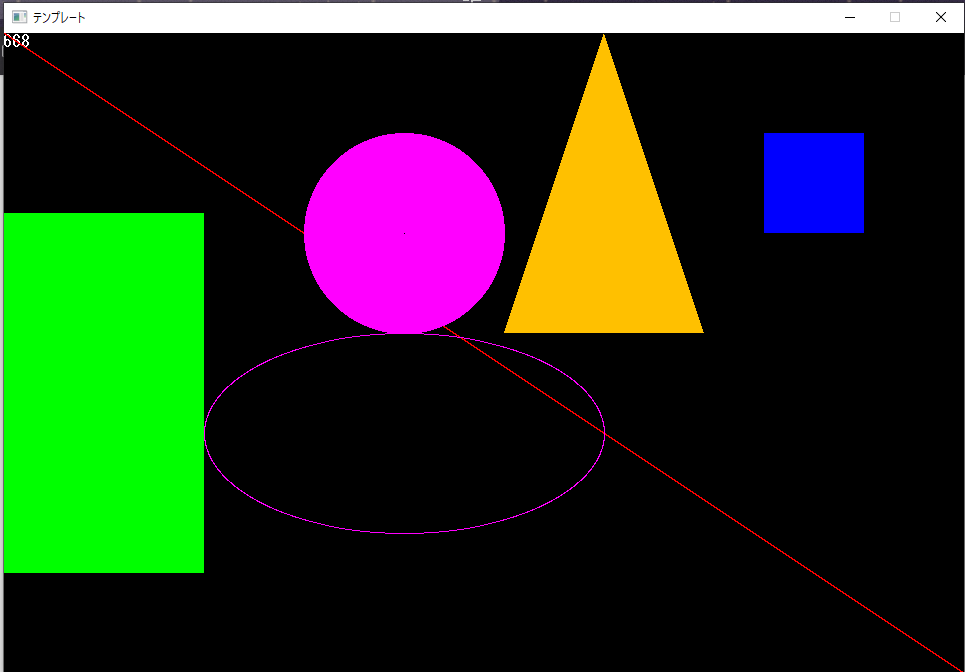
座標を指定して図形を描画する
| 関数名 | 説明 |
|---|---|
| 線 | (x1,y1)から(x2,y2)へ color で指定した色で線を引く |
| int DrawLine(int x1, int y1, int x2, int y2, unsigned int color); | |
| 矩形 | (「 )左上角を(x1,y1)、( 」)右下角を(x2-1,y2-1)とする矩形をcolorの色で描く。flagをTRUE(1)にすると矩形内部を塗りつぶし、FALSE(0)にすると輪郭のみ描く |
| int DrawBox(int x1, int y1, int x2, int y2,unsign int color, int flag); | |
| 円 | (x,y)を中心とする半径rの円をcolorの色で描く。flagはTRUEで塗りつぶし、FALSEで輪郭のみ描く |
| int DrawCircle(int x, int y, int r, unsigned int color, int flag); | |
| 楕円 | (x,y)を中心とし、x軸方向が半径rx, y軸方向が半径ryの楕円をcolorで描く。flagはTRUEで塗りつぶし、FALSEで輪郭のみを描く |
| int DrawOval(int x, int y, int rx, int ry, unsigned int color, int flag); | |
| 三角形 | (x1,y1)、(x2,y2)、(x3,y3)を頂点とする三角形をcolorの色で描く。flagはTRUEで塗りつぶし、FALSEで輪郭のみで描く |
| int DrawTriangle(int x1, int y1, int x2, int y2,int x3, int y3, unsigned int color, int flag) | |
| 点 | (x,y)にcolorの色の点を打つ |
| int DrawPixel(int x, int y, unsigned int color); | |
/*DXライブラリ動作確認用プログラム*/
#include "DxLib.h"

int WINAPI WinMain(HINSTANCE hInstance, HINSTANCE hPrevInstance, LPSTR lpCmdLine, int nCmdShow)
{
	//ウィンドウの幅と高さのピクセル数960*640
	const int WIDTH = 960, HEIGHT = 640;
	//よく使う色を定義
	const int WHITE = GetColor(255, 255, 255);

	//ウィンドウのタイトル
	SetWindowText("テンプレート");
	//ウィンドウの大きさとカラービット数の指定
	SetGraphMode(WIDTH, HEIGHT, 32);
	//ウィンドウモードで起動
	ChangeWindowMode(TRUE);

	if (DxLib_Init() == -1) return -1;
	SetBackgroundColor(0, 0, 0); //背景色の指定
	SetDrawScreen(DX_SCREEN_BACK); //描画面を裏画面にする

	int timer = 0; //経過時間を数える変数

	while(1) //メインループ
	{
		ClearDrawScreen(); //画面をクリアする
		timer++; //時間をカウント
		DrawFormatString(0, 0, WHITE, "%d", timer);

		//ここから記載
		DrawLine(0,0,WIDTH, HEIGHT, GetColor(255,0,0)); //線
		DrawBox(0, HEIGHT-460, 200, HEIGHT-100, GetColor(0, 255, 0), TRUE); //矩形(長方形)
		DrawBox(WIDTH-200, 100, WIDTH-100, 200, GetColor(0, 0, 255), TRUE); //矩形(正方形)
		DrawCircle(400, 200, 100, GetColor(255, 0, 255), TRUE); //円
		DrawOval(400, 400, 200, 100, GetColor(255, 0, 255), FALSE); //楕円
		DrawTriangle(600, 0, 500, 300, 700, 300, GetColor(255, 192, 0), TRUE); //三角形
		DrawPixel(400, 200, GetColor(0, 0, 0));

		//ここまで
		ScreenFlip(); //裏画面の内容を表画面に反映させる
		WaitTimer(33); //一定時間待つ(フレームレート30fps)
		if (ProcessMessage() == -1) break; //Windows から情報を受け取りエラーが起きたら終了
		if (CheckHitKey(KEY_INPUT_ESCAPE) == 1) break; //ESCキーが押されたら終了
	}

	DxLib_End(); //DXライブラリ使用の終了処理
	return 0; //ソフトの終了
}
Windowを表示
C言語
キー入力とマウス入力についてまとめます。
| キー入力 | int CheckHitKey(int keyCode); | 特定のキーの入力状態を得る。キーが押されたら、1が返り、押されていなければ0が返る |
|---|---|---|
| int GetHitKeyStageAll(char *keyStateBuf); | キーボードの全てのキーの押下状態を取得し、状態を配列に代入する | |
| マウス入力 | int GetMousePoint(int *xBuf, int *yBuf); | マウスポインタの座標を取得し、変数に代入する |
| int GetMouseInput(void); | マウスボタンの状態を得る |
キーコード
| キー | コード |
|---|---|
| カーソルキー | KEY_INPUT_UP、KEY_INPUT_DOWN、KEY_INPUT_LEFT、KEY_INPUT_RIGHT |
| スペースキー | KEY_INPUT_SPACE |
| Enterキー | KEY_INPUT_RETURN |
| Shiftキー | KEY_INPUT_LSHIFT、KEY_INPUT_RSHIFT |
| Escキー | KEY_INPUT_ESCAPE |
| A~Zキー | KEY_INPUT_A ~ KEY_INPUT_Z |
| 0~9キー | KEY_INPUT_0 ~ KEY_INPUT_9 |
| F1~F12キー | KEY_INPUT_F1 ~ KEY_INPUT_F12 |
文字列の表示関数
| 関数名 | 説明 |
|---|---|
| int DrawString(int x,int y,char *string, unsigned int color) | (x,y)を起点として、stringの文字列をcolorの色で表示する |
| int DrawFormaString(int x, int y,unsigned int color, char *format, 変数名); | (x,y)を起点として、formatで書式指定した文字列をcolorの色で表示する |
/*DXライブラリ動作確認用プログラム*/
#include "DxLib.h"

int WINAPI WinMain(HINSTANCE hInstance, HINSTANCE hPrevInstance,
LPSTR lpCmdLine, int nCmdShow)
{
//定数の宣言
 //ウィンドウの幅と高さのピクセル数
 const int WIDTH = 960, HEIGHT = 640;
  //よく使う色を定義
 const int WHITE = GetColor(255, 255, 255);

 //ウィンドウのタイトル
 SetWindowText("DXライブラリの使い方");
 //ウィンドウの大きさとカラービット数の指定
 SetGraphMode(WIDTH, HEIGHT, 32);
 //ウィンドウモードで起動
 ChangeWindowMode(TRUE);

if (DxLib_Init() == -1) return -1;
SetBackgroundColor(0, 0, 0); //背景色の指定
SetDrawScreen(DX_SCREEN_BACK); //描画面を裏画面にする

int timer = 0; //経過時間を数える変数

while(1) //メインループ
{
	ClearDrawScreen(); //画面をクリアする
	timer++; //時間をカウント
	DrawFormatString(0, 0, WHITE, "%d", timer);

//カーソルキーの入力
 if (CheckHitKey(KEY_INPUT_UP)) DrawString(0, 20, "上キー", WHITE);
 if (CheckHitKey(KEY_INPUT_DOWN)) DrawString(0, 40, "下キー", WHITE);
 if (CheckHitKey(KEY_INPUT_LEFT)) DrawString(0, 60, "左キー", WHITE);
 if (CheckHitKey(KEY_INPUT_RIGHT)) DrawString(0, 80, "右キー", WHITE);

  //マウスの座標を出力、マウスボタンの入力
 int mouseX, mouseY; //ポインタの座標を代入する
 GetMousePoint(&mouseX, &mouseY);
 DrawFormatString(400, 0, WHITE, "(%d, %d)", mouseX, mouseY);
  if (GetMouseInput() &MOUSE_INPUT_LEFT) DrawString(400, 20, "左ボタン", WHITE);
  if (GetMouseInput() &MOUSE_INPUT_RIGHT) DrawString(400, 40, "右ボタン", WHITE);

  ScreenFlip(); //裏画面の内容を表画面に反映させる
  WaitTimer(33); //一定時間待つ

 //Windows から情報を受け取りエラーが起きたら終了
 if (ProcessMessage() == -1) break;
 //ESCキーが押されたら終了
  if (CheckHitKey(KEY_INPUT_ESCAPE) == 1) break;
}

	DxLib_End(); //DXライブラリ使用の終了処理
	return 0; //ソフトの終了
}
C言語開発環境・DXライブラリの導入
C言語
C言語開発環境・DXライブラリの導入方法
- DXライブラリ置き場
- C言語直下にDxLib_VCフォルダを移動
-
- Visual Studioライブラリをつかえるようにする
-
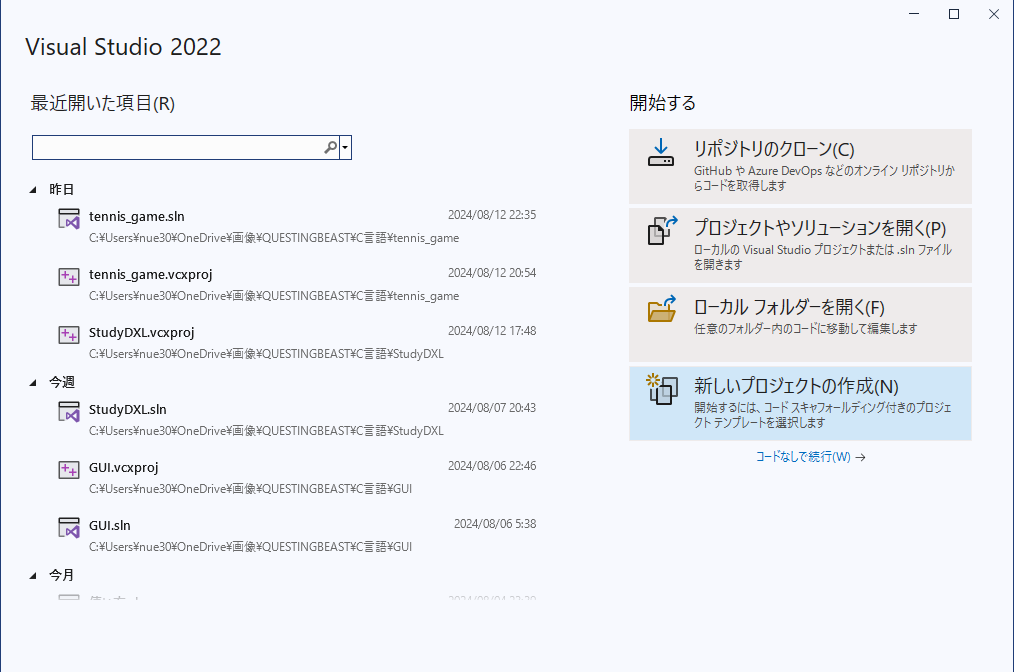 新しいプロジェクトの作成
 Windowsデスクトップウィザード
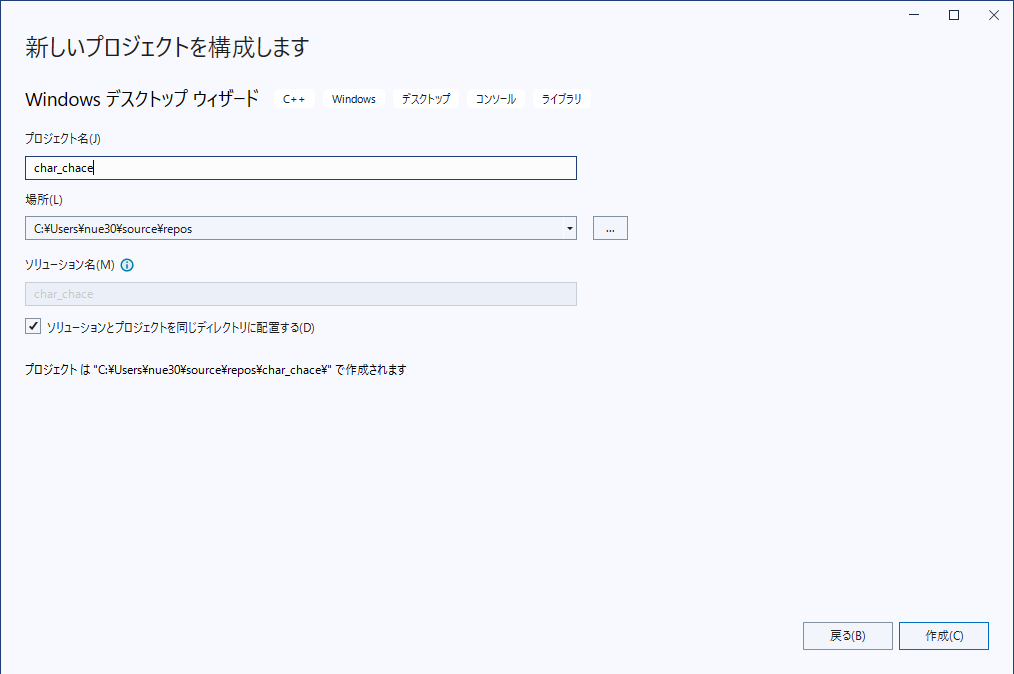 プロジェクト名を入力し、ソリューションとプロジェクトを同じディレクトリに配置するにチェックを入れる
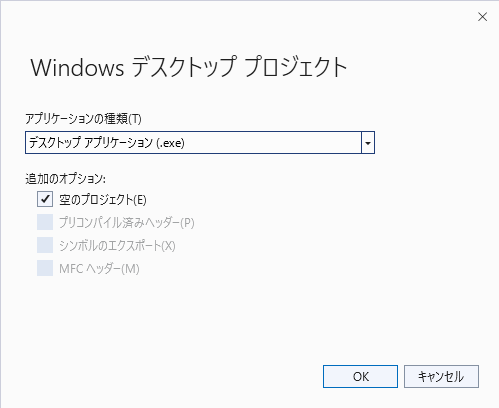 アプリケーションの種類:デスクトップアプリケーション(.exe)に変更
- 追加のオプション:空のプロジェクトにチェックを入れる
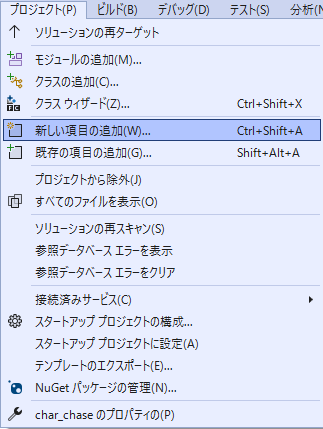 プロジェクト:新しい項目の追加
- C++ファイル.cppを選択。ファイル名を入力し、追加をクリック
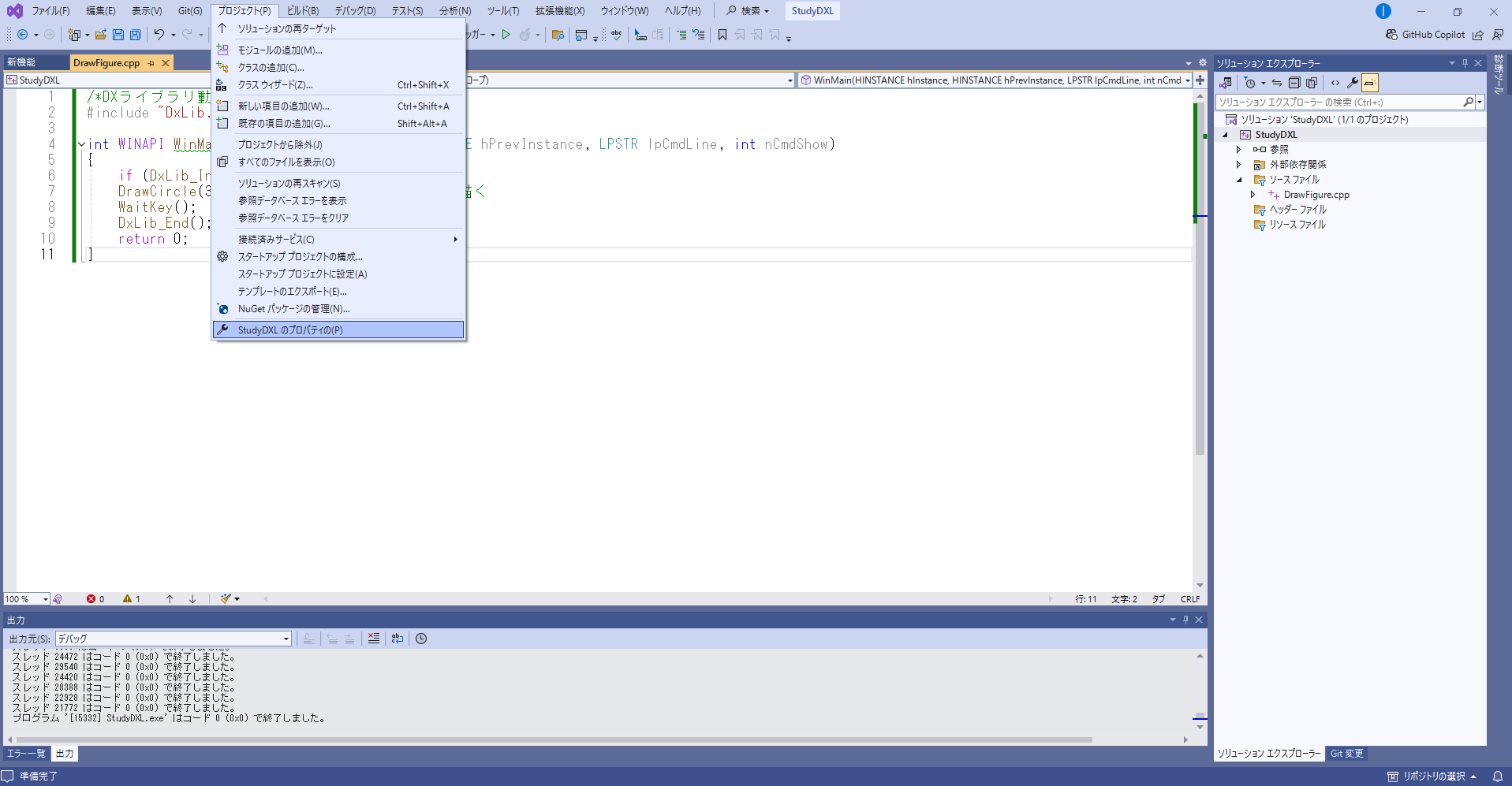
- プロジェクト:プロジェクト名のプロパティ
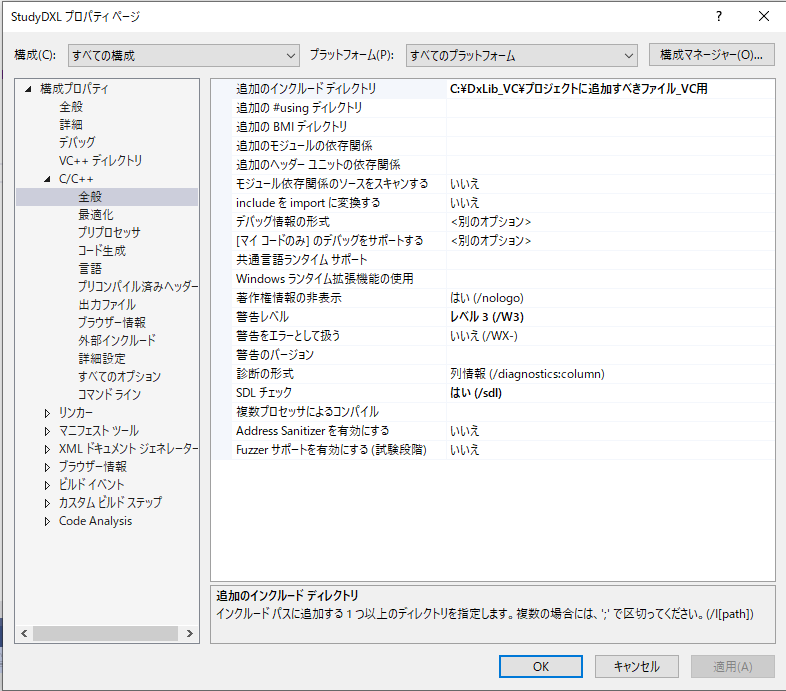
- 構成:全ての構成・プラットフォーム:すべてのプラットフォーム
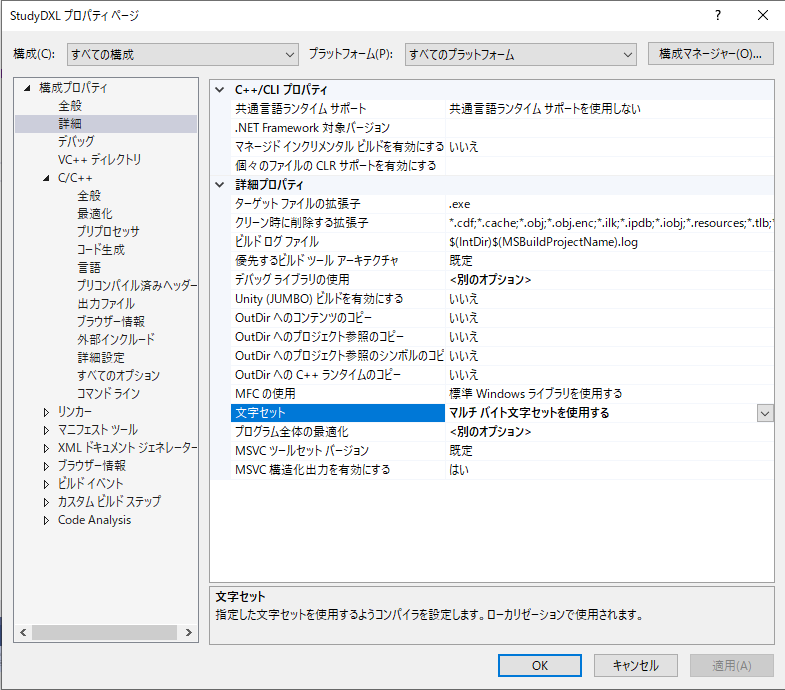
- 構成プロパティ:詳細→文字セット:マルチバイト文字セットを使用する
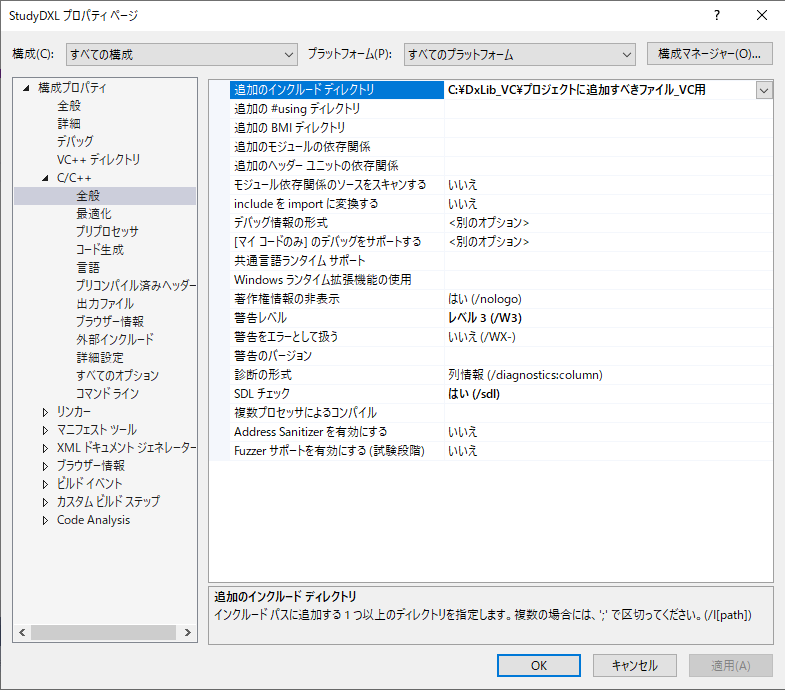
- C/C++:全般 → 追加のインクルードディレクトリ → 【コピー&ペースト】C:\DxLib_VC\プロジェクトに追加すべきファイル_VC用
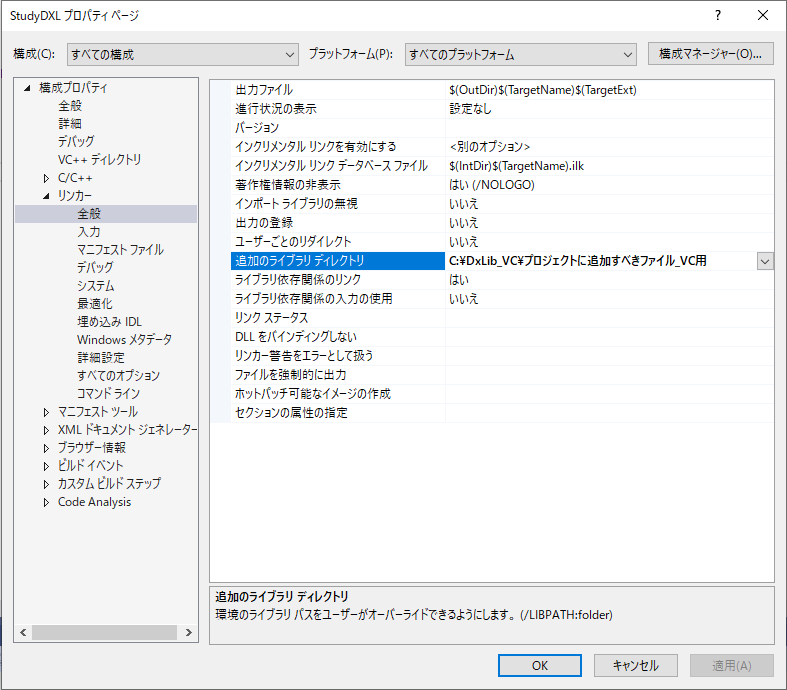
- リンカー:全般 → 追加のライブラリディレクトリ【コピー&ペースト】C:\DxLib_VC\プロジェクトに追加すべきファイル_VC用
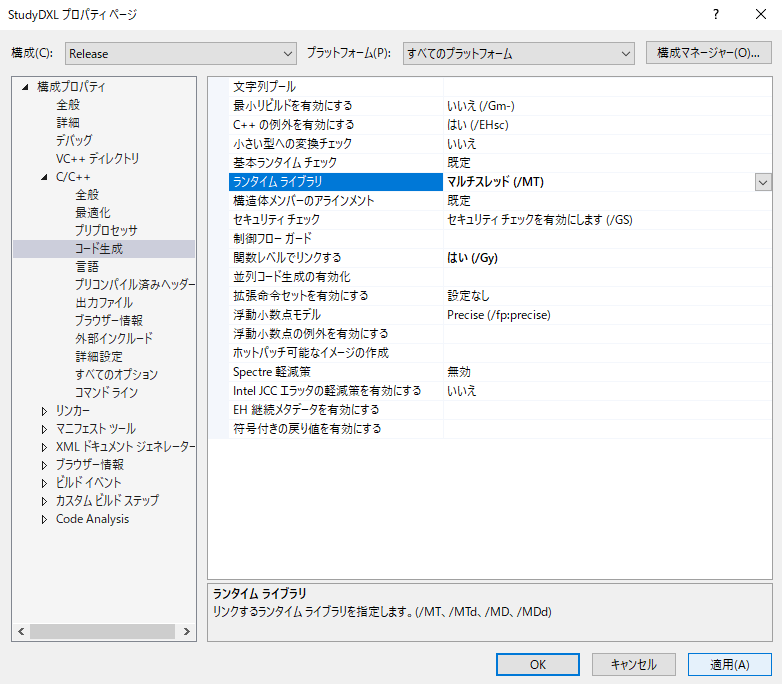
- 構成:Release → 【C/C++】→ コード生成 →ランタイムライブラリ → マルチスレッド(/MT)
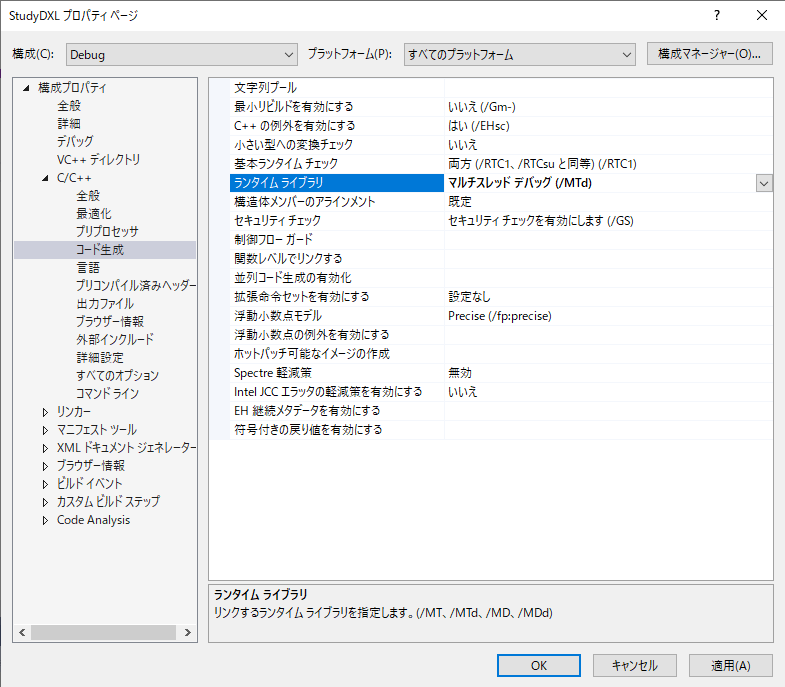
- 構成:Debug → C/C++ → ランタイムライブラリ:マルチスレッドデバック(/MTd)
-
- DX ライブラリ動作確認用プログラム
-
#include "DxLib.h"

int WINAPI WinMain(HINSTANCE hInstance, HINSTANCE hPrevInstance,
	LPSTR lpCmdLine, int nCmdShow)
{
	//定数の宣言
	 //ウィンドウの幅と高さのピクセル数
	const int WIDTH = 960, HEIGHT = 640;
	//よく使う色を定義
	const int WHITE = GetColor(255, 255, 255);

	//ウィンドウのタイトル
	SetWindowText("DXライブラリの使い方");
	//ウィンドウの大きさとカラービット数の指定
	SetGraphMode(WIDTH, HEIGHT, 32);
	//ウィンドウモードで起動
	ChangeWindowMode(TRUE);

	if (DxLib_Init() == -1) return -1;
	SetBackgroundColor(0, 0, 0); //背景色の指定
	SetDrawScreen(DX_SCREEN_BACK); //描画面を裏画面にする

	//変数宣言
	int timer = 0; //経過時間を数える変数

	while (1) //メインループ
	{
		ClearDrawScreen(); //画面をクリアする
		timer++; //時間をカウント
		DrawFormatString(10, 10, WHITE, "%d", timer);

		//ここから書く
		DrawCircle(480, 320, 100, 0x0000ff); //円を描く
		//-------------------------------------------------------
		ScreenFlip(); //裏画面の内容を表画面に反映させる
		WaitTimer(33); //一定時間待つ

		//Windows から情報を受け取りエラーが起きたら終了
		if (ProcessMessage() == -1) break;
		//ESCキーが押されたら終了
		if (CheckHitKey(KEY_INPUT_ESCAPE) == 1) break;
	}

	DxLib_End(); //DXライブラリ使用の終了処理
	return 0; //ソフトの終了
}
C言語でゲームプログラミングにリベンジ

C言語
C言語でゲームを作って若造だった時のトラウマを払拭するでゲス!?
プロフィール

| 名前 | ぬえさぶろう |
|---|---|
| 仕事 | PCの修理受付・取扱説明書作成 |
| 好物 | 大豆食品 |
| スキル | jQuery |
目次
翔泳社

ブックオフ